
Jobber is good software, and plenty of crews never need anything else. The owners who start looking usually hit one of three walls: the plan they need costs more than they expected, the feature they want sits one tier higher, or the add-ons quietly double the bill. If you've hit one of those, this list is for you. I compared five alternatives on what actually changes your monthly cost, which is how users or routes are counted, what's locked behind higher tiers, and what gets sold separately. All prices are as of October 2026.
Why owners start looking for a Jobber alternative
As of October 2026, Jobber's monthly plans look like this:
- Core: $49/month for 1 user
- Connect: $139/month for 1 user, or $199/month for 5 users
- Grow: $199/month for 1 user, or $299/month for 5 users
- Plus: from $499/month for 5 users
- Extra users: $29/month each
Annual billing lowers every tier. The bigger surprises tend to come from what's not included. Job costing only starts on Grow. Below Plus, the AI Receptionist is a $29/month add-on, Pipeline is $49/month, and the Marketing Suite is $99/month. Every person who logs in to view or manage the schedule counts as a user, office staff included.
None of that makes Jobber a bad deal. It means the right plan depends on how your crew is built, and that's worth checking against the options below. For context on why headcount pricing matters right now, the Bureau of Labor Statistics projects HVAC technician jobs will grow 8% between 2024 and 2034, faster than the average for all occupations. Most trades are hiring, and every hire can mean another software seat.
How I compared these tools
For each tool I looked at:
- Pricing unit: per user, per route, flat unlimited, or active users only
- Public pricing: whether you can see the price without a sales call
- Gated features: what only shows up on higher tiers
- Add-ons: what gets billed on top of the plan
- Best fit: crew size and trade
I left ServiceTitan off this list on purpose. It's built for shops with 15+ techs and a call center, and most Jobber users are smaller than that. If you're weighing the bigger platforms too, our roundup of field service management software covers eight tools including ServiceTitan.
Quick picks
- Lowest cost for small route-based crews: GorillaDesk
- Best for seasonal crews and all features from day one: Cleri
- Closest like-for-like switch: Housecall Pro
- Best for big teams on one flat bill: Service Fusion
- Best for phone-heavy, on-demand trades: Workiz
The 5 best Jobber alternatives
Cleri is our product. I've included it because it fits some readers well, and I've noted where the other tools beat it.
Cleri
- Best for: Owner-operators and crews of 2 to 10, especially lawn, snow and other seasonal businesses whose headcount changes through the year.
- Standout strength: You pay only for users who are active that month, and inactive users are free. Every feature is included from day one, so job costing isn't a tier upgrade. Cleo, the voice AI assistant in the web app, can create jobs, send quotes and assign techs from spoken commands, and the mobile app works offline when a crew loses signal.
- Pricing model: $100/month including 1 user, plus $20/month per active user. Payments run through Stripe at 2.9% + $0.30 per card transaction and 1% for ACH capped at $10, with no markup. 14-day free trial, no credit card.
- Watch out for: Cleri was founded in 2024, so it has fewer integrations than Jobber's app marketplace and fewer public reviews. Cleo works inside the app and doesn't answer your business phone, so it isn't a replacement for Jobber's AI Receptionist. Past roughly 10 active users, Service Fusion's flat pricing costs less.
Our side-by-side breakdown of Cleri and Jobber goes through the differences feature by feature.
Screenshot note: Capture the Cleri job costing view for one completed job in the web app, showing labor, materials and margin. Blur real customer names and addresses.
- Alt text: Cleri job costing view showing labor, materials and margin for one job
- File name: cleri-job-costing-view.jpg
- Caption: Job costing is included on every Cleri plan, not saved for a higher tier.
GorillaDesk
- Best for: Pest control, lawn care and other recurring route businesses with a few trucks and several office staff.
- Standout strength: Pricing is per route, not per user, and office staff, admins and devices are unlimited. If you run three trucks and have two people in the office, you pay for three routes.
- Pricing model: Basic is $49 per route per month, Pro is $99, and Growth is $149. 14-day free trial, no credit card, no contracts. SMS is the main add-on, at roughly $5/month for a local number plus message packages.
- Watch out for: QuickBooks sync, route optimization and the customer portal start on Pro, so a three-truck crew that needs them pays $297/month, not $147. The bill climbs fast as you add trucks, and the integration library is smaller than Jobber's.
Housecall Pro
- Best for: Residential home service crews that want a polished app with marketing and review tools built in.
- Standout strength: It's the closest feature match to Jobber, with a strong mobile app, review requests and customer communication tools. Switching between the two is usually the least disruptive move.
- Pricing model: Basic is $79/month ($59 billed annually) for 1 user. Essentials is $189/month ($149 annually) for up to 5 users, and QuickBooks integration starts here. MAX is $329/month ($299 annually) for up to 8 users, with extra users at $35/month.
- Watch out for: The user caps. A sixth person pushes you from Essentials to MAX. Some tools, like sales proposals, vehicle GPS and the flat-rate price book, are priced separately.
If Housecall Pro is on your shortlist, our Housecall Pro alternatives guide looks at it from the other side, and the Cleri and Housecall Pro comparison covers the details.
Service Fusion
- Best for: HVAC, plumbing and electrical shops with 10 or more office and field users.
- Standout strength: Unlimited users on every plan, so a new hire never changes the bill.
- Pricing model: Starter is $245/month month-to-month ($208 billed annually). Plus is $382/month ($325 annually). Pro is $627/month ($533 annually). Job costing and inventory start on Plus. Call tracking and GPS fleet tracking are add-ons.
- Watch out for: It costs too much for a crew of one to four. Reviewers often describe the interface as dated, and I couldn't find a self-serve free trial, so expect a demo first.
For a growing HVAC business, this tool is most likely to beat Cleri on cost once the team passes about ten people. Here's our fair comparison of Cleri and Service Fusion.
Workiz
- Best for: On-demand trades where most work starts with a phone call, such as locksmiths, garage door companies and appliance repair.
- Standout strength: A built-in phone system and AI call answering tied directly to jobs, which goes further on the phone side than Jobber's AI Receptionist add-on.
- Pricing model: Quote-only as of 2026, with Standard, Pro and Ultimate plans behind a "request pricing" button. 7-day free trial.
- Watch out for: The phone system, AI answering and marketing tools are sold separately. Automations are capped at 5 on Standard, 10 on Pro and 30 on Ultimate. Without published prices, you can't budget until you've talked to sales.
What a 3-truck crew actually pays
Here's the monthly cost for a common setup: owner, office manager and 3 techs (5 users, 3 routes), on no-commitment monthly billing as of October 2026.
- GorillaDesk Basic: 3 routes × $49 = $147/month ($297 on Pro if you need QuickBooks sync)
- Cleri: $100 + (4 × $20) = $180/month
- Housecall Pro Essentials: $189/month
- Jobber Connect: $199/month ($228 if you add the AI Receptionist)
- Service Fusion Starter: $245/month
- Jobber Grow: $299/month (needed for job costing)
- Workiz: quote-only
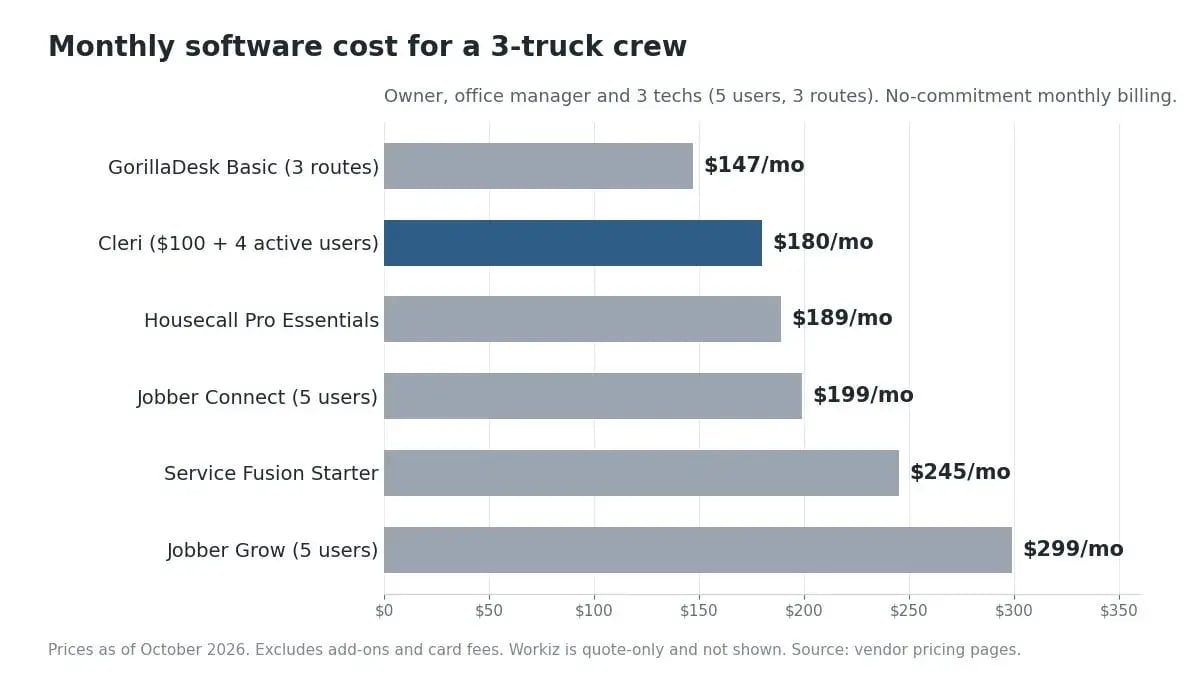
The ranking changes with your setup. Add a second office person and GorillaDesk stays the same while every per-user tool goes up. Grow to 12 people and Service Fusion's flat price wins. Run a lawn care business that drops to two people over winter, and an active-user model means you stop paying for the empty seats until spring.
How to choose without regretting it in month three
- Count users and routes separately. If you have more office staff than trucks, route-based pricing usually wins. If you have more trucks than office staff, per-user pricing often does.
- Count again for your slowest month. Seasonal businesses should price the off-season, not just July.
- Find the tier that unlocks your must-haves. Job costing, QuickBooks sync and route optimization are the usual surprises.
- Price the add-ons you'll really use. Phone answering, GPS and marketing tools are where bills creep.
- Run a real week in the trial. Schedule real jobs, send a real invoice, and have one tech use the app in the field.
Switching from Jobber: what to move first
- Export your client list, job history, quotes and unpaid invoices before anything else
- Rebuild your services and price list in the new tool before you schedule a job
- Set up recurring visits next, since they're the easiest thing to miss
- Run both systems for two weeks while techs learn the new app
- Cancel Jobber last, once the final export is done and every open invoice is paid or moved
Plumbing companies and other service trades should also carry over equipment and service history per address, because that's the data techs miss most once they're on site.
Frequently asked questions
What is the best alternative to Jobber?
It depends on how your crew is built. For a few trucks and several office staff, GorillaDesk's per-route pricing is usually cheapest. For seasonal crews, Cleri's active-user pricing fits best. Housecall Pro is the closest like-for-like switch, and Service Fusion suits teams of 10 or more.
Is there a free alternative to Jobber?
Not a full-featured one. The mobile apps are free to download, but every tool on this list needs a paid subscription to run scheduling, invoicing and payments. What you can get free is a trial: Cleri and GorillaDesk both offer 14 days with no credit card, and Workiz offers 7 days.
How much does Jobber cost per month?
As of October 2026, Core is $49/month for 1 user, Connect is $139/month for 1 user or $199/month for 5, Grow is $199/month for 1 user or $299/month for 5, and Plus starts at $499/month for 5 users. Extra users are $29/month each, and annual billing is cheaper.
How much does the Jobber AI Receptionist cost?
As of October 2026, it's a $29/month add-on on plans below Plus. If phone answering is your main need, Workiz builds its phone system and AI answering more deeply into the product, though it's sold separately and pricing is quote-only.
Is Jobber or Housecall Pro better?
They're closely matched for residential crews. Jobber has the larger integration library and a strong client hub, while Housecall Pro leans more on built-in marketing and review tools. The deciding factor is usually pricing: compare Jobber's per-user tiers with Housecall Pro's 5-user and 8-user caps against your actual headcount.
Try it on your own jobs
If your crew is under 10 people or changes size with the seasons, run a real week in Cleri and compare the bill with what you pay now. Start your free 14-day Cleri trial, no credit card needed, or see the full breakdown on the Cleri pricing page.
Reviewed by Brandon Parham, industry expert.
.png "Frame 1984078137 (1)")
Try Cleri’s 14-day free trial and
see for yourself
No credit card. No setup calls. Just your real jobs, your real crew, and a
smoother, more predictable week.
