
Picture the real morning rush.
It’s 5:30 a.m. You get a voice note: “Can you clean the lobby glass by nine?” One worker calls in sick. Another is stuck in traffic. Yesterday’s paper route sheet was wet. Three addresses have washed away. The day feels messy before your first ladder goes up.
That gut‑drop moment is exactly what window cleaning business software wipes away. One friendly app keeps jobs, routes, photos, bills, and reviews in sync, even when the day tries to throw dirt on your plans.
What you’ll learn in this guide
- A simple definition, no tech jargon
- The types of software you'll see (and what the different names actually mean)
- Whether residential and commercial operations need different tools
- What it typically costs
- A 90-day plan for switching off paper
What is window cleaning business software?
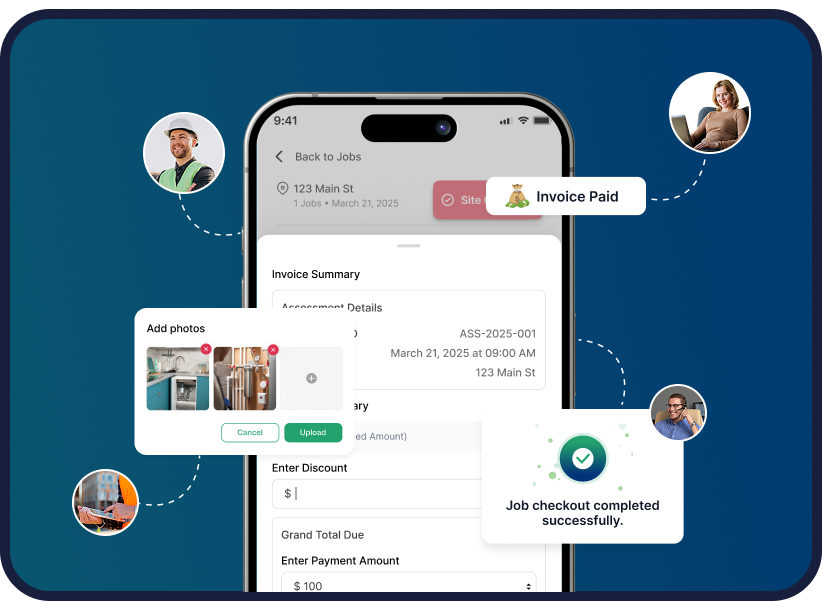
Window cleaning business software is a pocket-sized office. It's an app on your phone, tablet, or laptop that runs the business side of a window cleaning operation: scheduling, customer records, routing, quoting, invoicing, and payments, all in one place.
In practice, it lets you:
- Store every customer's name, gate code, and preferred appointment time
- Drag today's jobs to Friday with two taps when a storm hits
- Pick the fastest driving route between stops
- Snap before-and-after photos that auto-attach to invoices
- Email or text the bill on site and take card or bank payment right there
- Send a "How did we do?" review link once you pack the ladder
If you've ever searched for a window cleaning scheduling app, a quoting tool, or an invoicing system separately this is those tools combined, sharing one customer record.
Service software, company software, program what do the names mean?
Shopping for this category gets confusing fast because the same thing goes by several names. Here's the translation:
| What you'll see it called | What it usually means |
|---|---|
| Window cleaning service software | The full package scheduling, dispatch, invoicing, customer records |
| Window cleaning company software | Same thing, usually marketed toward multi-crew operations |
| Window cleaning software program | Older phrasing; sometimes signals installed desktop software rather than a cloud app |
| Field service management (FSM) software | The broader category the same tools, built for any mobile trade |
The label matters less than the checklist: can it handle recurring jobs, route-heavy days, on-site payment, and photo documentation? Those four are what make software fit window cleaning specifically. (For the full buying checklist, see top features to look for in window cleaning software.)
Why window cleaning needs its own software
Generic tools are built for carpet jobs, housekeepers, or floor scrubbers. They work, but they don't "get" your day. Window cleaning is different: you're outside, on ladders, rushing between short jobs, fighting weather, glare, and tight timelines.
Here's what window crews specifically need:
- Fast reschedules when rain hits: a drag-and-drop calendar that updates the crew and the customer at once
- Before-and-after photo logs: to end "you missed a spot" callbacks
- High job volume handling: 15–20 short stops a day, not three long ones
- Recurring schedules: because the same storefront needs the same clean every two weeks
- Route optimization: short jobs mean drive time is your biggest hidden cost
“All my time is spent in the dirt, and it’s tough to stay on top of everything. Thankfully there’s Cleri. It made the hardest parts of owning a business easy, and that’s something I can stand behind.”
Brad, Seasons Irrigation
Residential vs. commercial window cleaning software
The same core system serves both, but the emphasis shifts and if your work leans commercial, check for the second column before you buy:
| Need | Residential focus | Commercial focus |
|---|---|---|
| Scheduling | One-off and seasonal jobs, homeowner reminders | Recurring contracts on weekly/monthly cycles |
| Access & site info | Gate codes, pets, fragile panes | Site inductions, ladder/lift notes, multi-story safety records |
| Billing | Pay-on-completion by card or link | Invoicing to accounts, net terms, per-site billing across locations |
| Documentation | Before/after photos for the homeowner | Time-stamped proof of service for property managers |
| Who you answer to | The person at the door | A facilities manager who may never see the work |
Commercial window cleaning software is really the same product with the contract features switched on: recurring billing, multi-site customer records, and documentation a property manager can audit. Solo residential operators need less of that which is why pricing that scales with team size matters more than a long feature list.
What does it cost?
Most tools in this category run $30–$150+ per month, usually priced per user, with features split across plan tiers scheduling on the cheap tier, invoicing or reports locked behind higher ones.
Cleri prices it differently: a flat $100/month including one user, plus $20/month per additional active user, with every feature included from day one. Anyone who doesn't log in during a month is marked inactive and costs nothing which is how seasonal window cleaning crews avoid paying for winter.
Whichever tool you look at, the math to run is simple: one recovered missed invoice, or one extra job a week from tighter routing, typically covers the monthly cost. For the full breakdown of what the payoff looks like in hours and jobs, see the benefits of window cleaning software.
Tools you can try today
Free to start:
- Connecteam — jobs, chat, time-clock
- DoTimely — recurring jobs, GPS photos
- Orcatec — quotes, scheduling, simple reports
Paid to grow:
- Jobber — all-in-one, QuickBooks integration, drag-and-drop scheduling
- Housecall Pro — review texts, card payments, financing
- Workiz — live dispatch board, crew texts, fast invoices
- Service Fusion — GPS map, voice notes, smart routes
- Cleri — weather rescheduling, photo logs, voice AI assistant, flat pricing
Most offer free trials. For a side-by-side breakdown, see our comparison of the top window cleaning software tools.
How to switch from paper in 90 days
If your clipboard still runs the show, you're not alone. Here's a step-by-step way to ease into software, test what works, and feel the difference without the overwhelm:
- Week 1: Write down your current job flow, from first call to final payment. This shows you where the delays actually happen.
- Weeks 2–3: Sign up for free trials of two tools and run a few real jobs through each.
- Weeks 4–6: Pick your favorite. Let one crew use it fully photos, quotes, time tracking.
- Weeks 7–10: Add all your customers, connect your accounting, switch on card payments.
- Weeks 11–12: Turn on auto-review texts. You'll likely see more Google reviews without asking twice.
End goal: by month three, less paperwork, more jobs done, and payment in the bank by morning.
FAQs
Q 1. Is this different from generic cleaning software?
Yes. It handles rain reschedules, photo documentation, and rapid-fire routing between short jobs the parts of window cleaning that carpet and maid-service apps overlook.
Q 2. What's the difference between window cleaning service software and company software?
Mostly marketing. Both mean the same core system; "company software" usually signals multi-crew features like permissions and crew tracking are included.
Q 3. Do I need commercial window cleaning software for storefront contracts?
You need the commercial features: recurring billing, per-site records, and time-stamped service documentation. Check those three before committing not every tool at the low end has them.
Q 4. Can I run it on my phone?
Yes Android or iOS, and the better tools sync offline if you're working somewhere without signal.
Q 5. When should I pay for a plan?
The moment free limits stall your bookings. One extra job usually pays the bill.
Final takeaways
- Window cleaning business software is one app for jobs, routes, customers, photos, and payments replacing the clipboard, the spreadsheet, and the payment chase.
- The category names (service software, company software, program) all point at the same thing; judge by the checklist, not the label.
- Commercial work needs recurring billing and audit-ready documentation; residential work needs speed and simplicity. Pick for the mix you actually run.
- Start with a free trial, load 3–5 real jobs, and let your crew vote with their thumbs.
Want to see how Cleri handles your next Monday?
No credit card, no contracts, just faster jobs and steady growth.
Reviewed by Brandon Parham, industry expert. Published June 30, 2025 · Last updated July 25, 2026.
Related Articles

Plumbing Job Management Software: What It Actually Runs
The call that breaks your day is never the...
3D Spray Foam Estimating Tools: What They Do & Don't Solve
In spray foam, the numbers on the estimate shape...
HVAC CRM Software: Why Contractors Outgrow Generic CRMs
Most HVAC companies start with whatever CRM was...

Field Service Automation: What It Handles & How It Works
Every field service business runs on the same...

Blue Collar Business Software: What Field Crews Need
Blue-collar businesses today need more than hard...
12 Window Cleaning Software Mistakes to Avoid
Common mistakes businesses make when choosing...
.webp)
Best Spray Foam Estimating Software Compared (2026)
Quoting spray foam jobs has changed. Customers...

Vibe Coded Field Service Software: Risks to Check First
Something new is happening in the field service...

How Lawn Care Estimating Software Works (and Why Crews Use It)
Lawn care estimating & quoting software: The tool...

Why Lawn Care CRM Software Matters in 2026
Lawn care CRM software: Why 91% of growing teams...

How to choose the right software for your window cleaning company
Still using paper schedules, texting your crew...

Window Cleaning Software Features: What the Best Apps Include
If you've ever felt like your crew's working hard...
.png "Frame 1984078137 (1)")
Try Cleri’s 14-day free trial and
see for yourself
No credit card. No setup calls. Just your real jobs, your real crew, and a
smoother, more predictable week.
