
Most owners I talk to don't leave Housecall Pro because it's bad. They leave because the bill stops matching the crew. You hire a sixth person, the Essentials plan tops out at five users, and suddenly you're on MAX at $329 a month before a single add-on. If that's where you are, this list is for you. I've put five alternatives side by side on the things that actually change your monthly cost: how users are counted, what's locked behind higher tiers, and what gets sold separately. All prices are as of October 2026.
Why trade owners start looking for a Housecall Pro alternative
Housecall Pro is a solid product for residential home service work. The mobile app is polished, review management is built in, and plenty of owners run happily on it for years. The friction is almost always pricing structure, not features.
As of October 2026, Housecall Pro has three plans:
- Basic: $79/month, or $59/month billed annually, for 1 user
- Essentials: $189/month, or $149/month billed annually, for up to 5 users. QuickBooks integration starts here.
- MAX: $329/month, or $299/month billed annually, for up to 8 users, with extra users at $35/month each
On top of that, some tools are sold separately. Third-party pricing reviews from 2026 put the sales proposal tool at roughly $40/month, vehicle GPS at around $20 per vehicle per month, and the flat-rate price book at around $149/month.
That structure gets expensive at exactly the moment you're growing. And most trade shops are trying to grow headcount right now. The Bureau of Labor Statistics projects HVAC technician jobs will grow 8% from 2024 to 2034, much faster than the average for all occupations. When every new hire is also a new software seat, the way a tool counts users matters as much as its feature list.
How I compared these tools
I looked at five things for each platform:
- How users are counted: per seat, per tier cap, flat unlimited, or active users only
- Public pricing: can you budget without a sales call
- What's gated: which features only show up on higher tiers
- Add-ons: what gets billed on top of the plan
- Who it fits: crew size and trade type
If you want the wider view across every field service platform, not just Housecall Pro switchers, our field service management software roundup covers eight tools in more depth.
Quick picks
- Best for small and seasonal crews: Cleri
- Best for residential crews that want lots of integrations: Jobber
- Best for large teams on a flat bill: Service Fusion
- Best for phone-heavy, on-demand trades: Workiz
- Best for established shops with 15+ techs: ServiceTitan
The 5 best Housecall Pro alternatives
Cleri is our product. I've included it because it's a genuine fit for some readers, and I've noted where the other tools beat it.
Cleri
- Best for: Owner-operators and crews of 2 to 10 people, especially businesses with seasonal or part-time staff.
- Standout strength: You only pay for users who actually log in and work that month. Inactive users are free, so a lawn or snow crew that shrinks in the off-season doesn't keep paying for empty seats. Every feature is included on day one, and Cleo, the voice AI assistant in the web app, can create jobs, send quotes and assign techs from plain spoken commands.
- Pricing model: $100/month including 1 user, plus $20/month per active user. Payments run through Stripe at 2.9% + $0.30 per card transaction and 1% for ACH capped at $10, with no markup. 14-day free trial, no credit card.
- Watch out for: Cleri was founded in 2024, so the integration library is smaller than Jobber's and there are fewer public reviews to read. Past roughly 10 active users, Service Fusion's flat unlimited-user plans cost less. And if marketing tools like review campaigns or a built-in website matter more to you than back-office work, Jobber and Housecall Pro go further there.
If you want the line-by-line breakdown against the tool you're leaving, see how Cleri compares with Housecall Pro.
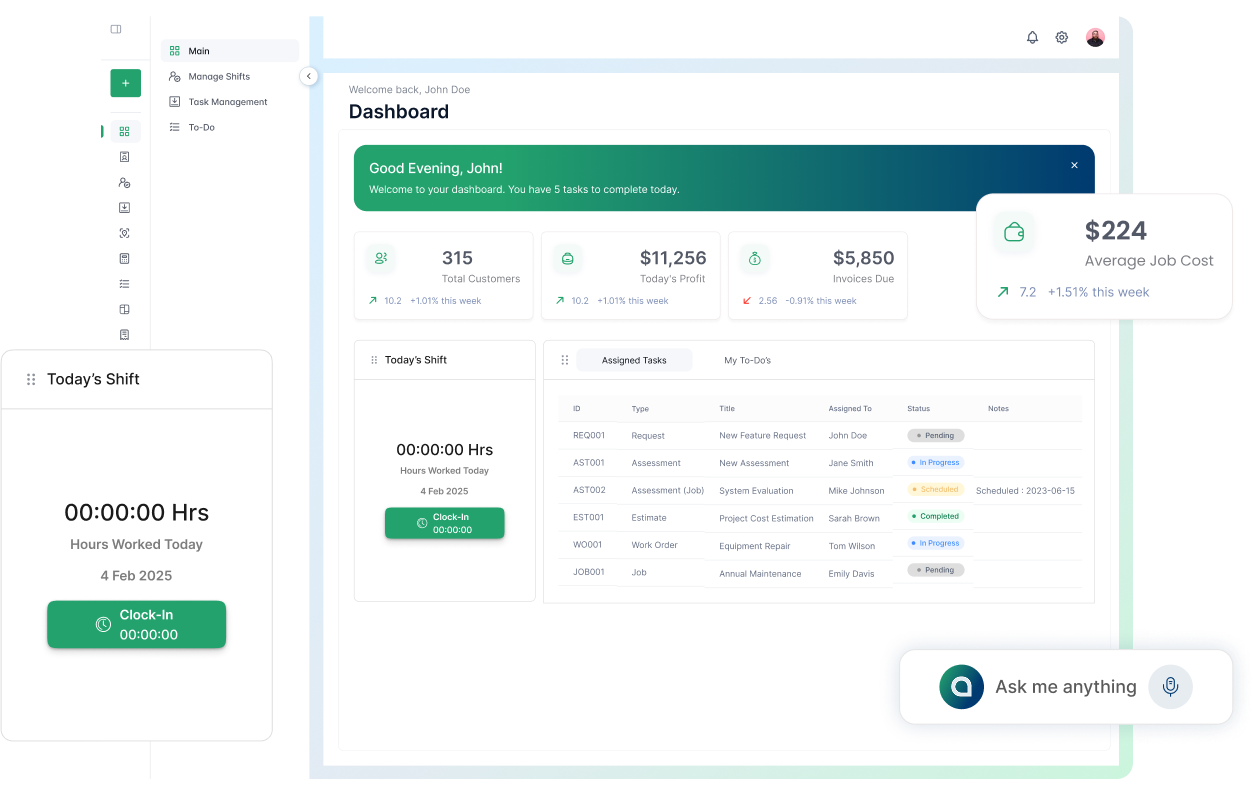
Jobber
- Best for: Residential home service businesses that want a polished client experience and a wide set of integrations.
- Standout strength: The client hub lets customers approve quotes, check appointments and pay invoices in one place. The app marketplace connects 100+ tools, and QuickBooks Online and Xero sync start on the Connect plan.
- Pricing model: Core is $49/month for 1 user. Connect is $139/month for 1 user or $199/month for 5 users. Grow is $199/month for 1 user or $299/month for 5 users. Plus starts at $499/month for 5 users. Extra users are $29/month each, and annual billing lowers every tier. 14-day free trial, no credit card. Card payments are 2.9% + 30¢ and ACH is 1%.
- Watch out for: Job costing only starts on Grow. Below Plus, the AI Receptionist ($29/month), Pipeline ($49/month) and Marketing Suite ($99/month) are paid add-ons. Every person who logs in to view or manage the schedule counts as a user, including office staff.
Jobber is the closest like-for-like switch from Housecall Pro, so it deserves a careful look. Our Cleri and Jobber breakdown goes through the differences feature by feature.
Service Fusion
- Best for: HVAC, plumbing and electrical shops with 10 or more office and field users.
- Standout strength: Unlimited users on every plan. Adding a tech or a dispatcher doesn't change your bill, which is rare in this category.
- Pricing model: Starter is $245/month month-to-month ($208/month billed annually). Plus is $382/month ($325 annually). Pro is $627/month ($533 annually). Job costing and inventory start on Plus. Call tracking and GPS fleet tracking are separate add-ons.
- Watch out for: The flat rate is overkill if you're a crew of one to four people. Reviewers often describe the interface as dated, and I couldn't find a self-serve free trial listed, so expect a demo before you get access.
For a big team, this is the tool most likely to beat Cleri on monthly cost. Here's a fair look at Cleri against Service Fusion if you're weighing the two.
Workiz
- Best for: On-demand, phone-driven trades like locksmiths, garage door companies and appliance repair businesses.
- Standout strength: A built-in phone system and AI call answering that tie calls directly to jobs, which matters when most of your work starts with a ringing phone.
- Pricing model: Quote-only as of 2026. The pricing page lists Standard, Pro and Ultimate, each with a "request pricing" button. 7-day free trial.
- Watch out for: The phone system, AI answering and marketing tools are sold separately from the plan. Automations are capped at 5 on Standard, 10 on Pro and 30 on Ultimate. Since there are no published prices, you can't budget accurately without a sales call.
ServiceTitan
- Best for: Established HVAC, plumbing and electrical companies with 15+ technicians, a dedicated call center and a full office team.
- Standout strength: Depth. Call booking, pricebook management, memberships and reporting are built for large operations in a way the lighter tools on this list aren't.
- Pricing model: Quote-only, priced per technician. Third-party reviews in 2026 estimate roughly $245 to $500 per tech per month, plus implementation fees reported anywhere from $5,000 to $50,000+. No free trial.
- Watch out for: Rollouts can take months, and the per-technician price is hard to justify for small crews. If you're leaving Housecall Pro because it got expensive, ServiceTitan is usually a step up in cost, not down.
If you're an HVAC owner sizing up the bigger platforms, our HVAC business software page and the ServiceTitan comparison are the next two reads.
What a 6-person crew actually pays
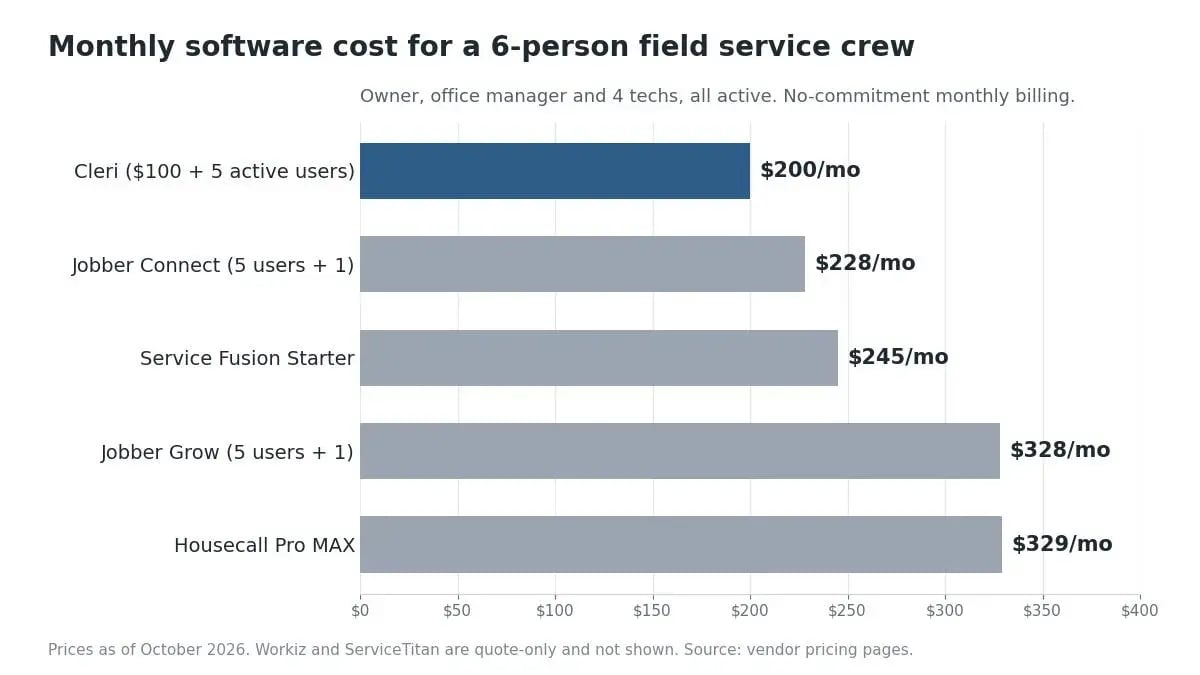
Feature lists only tell half the story. Here's the monthly cost for a common setup: owner, office manager and 4 field techs, all logging in every month, on no-commitment monthly billing as of October 2026.
- Cleri: $100 + (5 × $20) = $200/month
- Jobber Connect: $199 for 5 users + $29 for the sixth = $228/month
- Service Fusion Starter: $245/month (or $382 on Plus if you need job costing)
- Jobber Grow: $299 for 5 users + $29 = $328/month
- Housecall Pro MAX: $329/month (6 users is over the Essentials cap of 5)
- Workiz and ServiceTitan: quote-only
Now flip it to 15 active users. Cleri comes to $380/month, Housecall Pro MAX to $574/month (8 included plus 7 × $35), and Service Fusion Starter stays at $245/month. That's the honest tradeoff: per-user tools win for small crews, flat-rate tools win for big ones.
The seasonal angle changes the math again. A lawn care business running 10 people in July and 3 in January pays for 3 users in January on an active-user model, but for every seat on a tier-capped plan.
How to pick without regretting it in month three
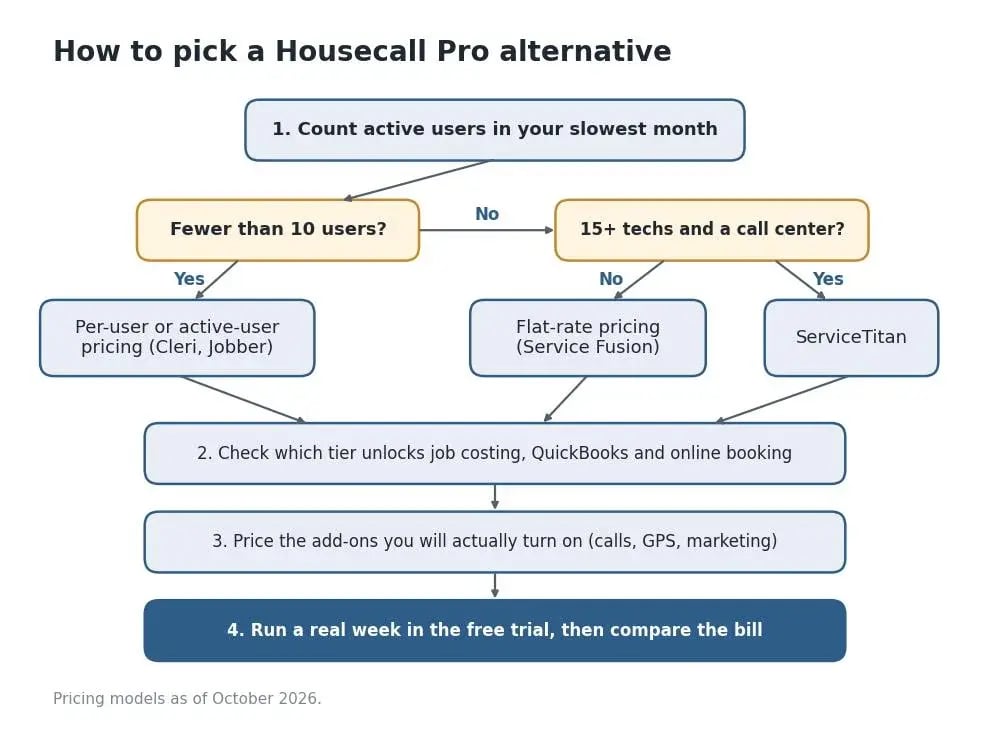
- Count your real users, then count them in your slowest month. If those numbers are far apart, active-user or flat-rate pricing will save you more than any feature.
- List the three features you use daily. Then check which tier unlocks them. Job costing, QuickBooks sync and online booking are the usual surprises.
- Price the add-ons you'll actually turn on. Call answering, GPS and marketing tools are where bills creep.
- Take the free trial with real jobs. Schedule a real week, send a real invoice, and have one tech use the mobile app in the field.
- Ask about exports before you sign. You want your customer list, job history and invoices out in a spreadsheet if you ever leave.
Switching from Housecall Pro: what to move first
Most switches go wrong because the owner cancels too early. Here's the order I recommend:
- Export first: customer list, job history, open estimates and unpaid invoices
- Rebuild your price book in the new tool before you schedule anything
- Set up recurring jobs and service plans next, since those are easy to miss
- Run both systems for two weeks so nothing falls through while your techs learn the new app
- Cancel Housecall Pro last, after the final export and once every open invoice is paid or moved
Plumbing teams and HVAC shops should also move equipment and service history per address, because that's the data techs miss most in the field.
Frequently asked questions
Who competes with Housecall Pro?
The main competitors are Jobber, ServiceTitan, Workiz, Service Fusion and Cleri. Jobber is the closest like-for-like option for residential crews, ServiceTitan targets large operations, Service Fusion suits big teams on a flat bill, and Cleri fits small and seasonal crews with active-user pricing. You can see head-to-head breakdowns on our comparison hub.
What does Housecall Pro cost per month?
As of October 2026, Basic is $79/month ($59 billed annually) for 1 user, Essentials is $189/month ($149 annually) for up to 5 users, and MAX is $329/month ($299 annually) for up to 8 users, with extra users at $35/month. Some tools, like sales proposals and vehicle GPS, cost extra.
Is Housecall Pro like QuickBooks?
No. Housecall Pro runs field operations: scheduling, dispatch, estimates and invoicing. QuickBooks handles accounting. Housecall Pro connects to QuickBooks starting on the Essentials plan, and most alternatives on this list also sync with QuickBooks.
Does Housecall Pro do bookkeeping?
Housecall Pro offers a separate bookkeeping service called Housecall Pro Accounting, which syncs with your account and includes access to a bookkeeper team. It's an extra service, not part of the standard plans.
What is the best service-based business software?
It depends on crew size more than trade. For 1 to 10 people, a per-user or active-user tool like Cleri or Jobber is usually cheapest. For 10+ users, flat-rate pricing like Service Fusion often wins. For 15+ techs with a call center, ServiceTitan's depth can justify its cost.
Try it with your own jobs
If your crew is under 10 people or changes size with the seasons, run a real week in Cleri and compare the bill. Start your 14-day Cleri free trial, no credit card needed, and check the full breakdown on the Cleri pricing page.
Last updated October 5, 2026. Pricing verified October 5, 2026.
Related Articles

Best Window Cleaning Software Compared: 7 Tools
Running a window cleaning business means juggling...

Best Field Service Management Software: 8 Tools (2026)
Field service management software runs the...

6 ServiceTitan Alternatives for Growing Trade Shops (2026)
ServiceTitan is the most complete platform in...

5 Jobber Alternatives for Small Trade Crews (2026)
Jobber is good software, and plenty of crews...
Housecall Pro vs Jobber: Pricing and Features Compared (2026)
Housecall Pro and Jobber are the two names most...

Best Lawn Care Software Compared: 8 Tools Reviewed (2026)
There are more lawn care software options than...

Best Spray Foam Estimating Software Compared (2026)
Quoting spray foam jobs has changed. Customers...

3D Spray Foam Estimating Tools: What They Do & Don't Solve
In spray foam, the numbers on the estimate shape...

What Is Window Cleaning Business Software & Who Needs It?
Picture the real morning rush.
It’s 5:30 a.m. You...

How Lawn Care Estimating Software Works (and Why Crews Use It)
Lawn care estimating & quoting software: The tool...

Plumbing Job Management Software: What It Actually Runs
The call that breaks your day is never the...

SaaS vs On-Premise for Window Cleaning Businesses
SaaS vs. On-Premise: What's Better for Window...

Try Cleri’s 14-day free trial and
see for yourself
No credit card. No setup calls. Just your real jobs, your real crew, and a
smoother, more predictable week.
