
Housecall Pro and Jobber are the two names most trade owners shortlist first, and on paper they look almost identical. Both handle scheduling, quotes, invoices and payments, and both have solid mobile apps. The real differences sit in how each one prices users, which features are locked behind which tier, and what gets sold as an add-on. I compared both on the things that change your monthly bill and your working day, using each company's published pricing as of October 2026.
The short answer
- Solo operator who needs the basics: Jobber Core is cheaper to start ($49/month vs $79/month).
- Small crew that wants job costing: Housecall Pro includes job cost tracking on every plan. Jobber only adds it on Grow.
- Crew that lives in QuickBooks with 1 to 4 people: Jobber Connect is usually the cheaper way in.
- Crew of 6 to 8: Housecall Pro MAX covers up to 8 users at one price, while Jobber adds $29 per extra user.
- Business that depends on integrations: Jobber has the larger app marketplace.
Pricing side by side
Here are the month-to-month prices as of October 2026. Both companies discount annual billing.
| Plan level | Housecall Pro | Jobber |
|---|---|---|
| Entry | Basic: $79/mo, 1 user | Core: $49/mo, 1 user |
| Middle | Essentials: $189/mo, up to 5 users | Connect: $139/mo for 1 user, $199 for 5 |
| Upper | MAX: $329/mo, up to 8 users | Grow: $199/mo for 1 user, $299 for 5 |
| Top | No fourth plan. MAX is the top tier, and larger teams add seats to it | Plus: from $499/mo for 5 users |
On Jobber, every extra user costs $29/month. Housecall Pro sells seats in blocks: 1, up to 5, or up to 8. MAX is its highest plan, and teams larger than 8 pay for extra seats on top of it.
Both offer a 14-day free trial with no credit card. Housecall Pro's trial runs on the MAX plan, so you see every feature, and Housecall Pro says it has no long-term contracts.
What the same features cost on each
Plan names hide the real comparison. What matters is the cheapest plan that gives you the feature you actually need.
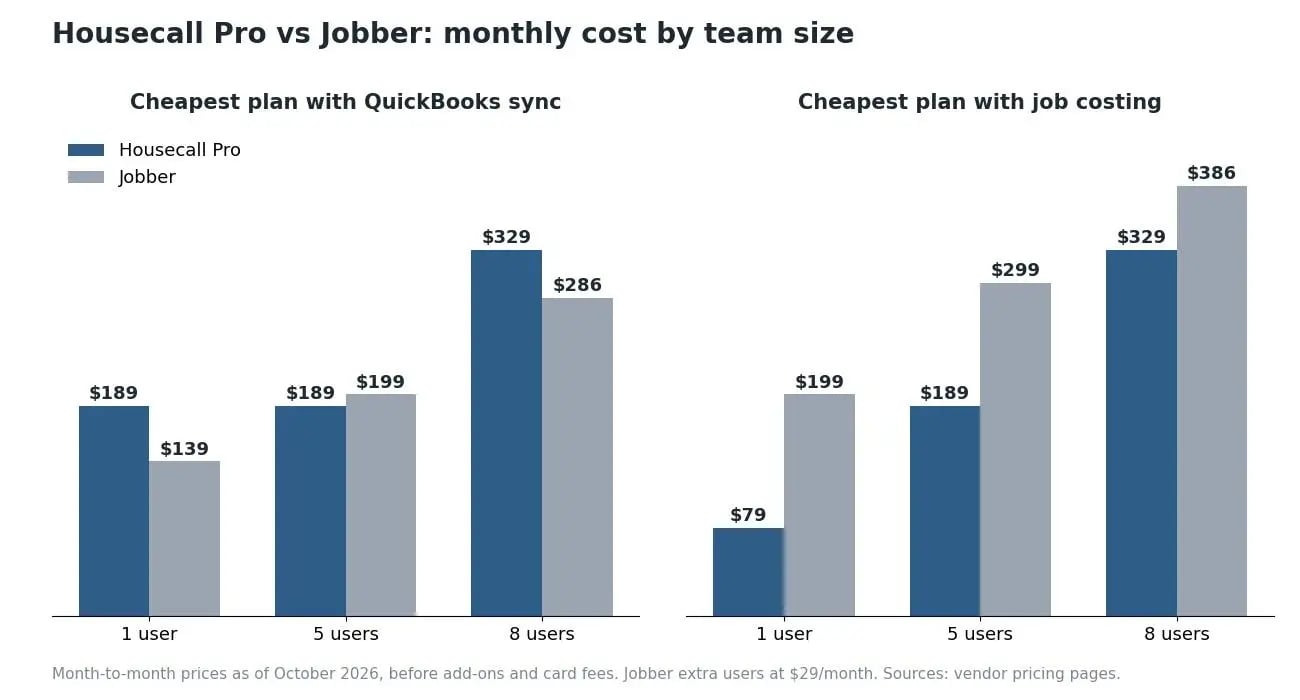
If you need QuickBooks sync
Housecall Pro adds QuickBooks Online and Desktop on Essentials. Jobber adds QuickBooks Online and Xero sync on Connect.
- 1 user: Jobber Connect $139 vs Housecall Pro Essentials $189
- 5 users: Jobber Connect $199 vs Housecall Pro Essentials $189
- 8 users: Jobber Connect $286 ($199 + 3 × $29) vs Housecall Pro MAX $329
If you need job costing
This is the biggest gap between the two. Housecall Pro lists job cost tracking on its Basic plan, so every plan has it. On Jobber, job costing starts on Grow.
- 1 user: Housecall Pro Basic $79 vs Jobber Grow $199
- 5 users: Housecall Pro Essentials $189 vs Jobber Grow $299
- 8 users: Housecall Pro MAX $329 vs Jobber Grow $386 ($299 + 3 × $29)
If you price jobs by margin, as most HVAC companies and plumbing shops eventually do, that difference adds up to more than $1,000 a year for a small crew.
Features compared
Scheduling and dispatch
Both have drag-and-drop scheduling, a dispatch view and "on my way" texts. Jobber advertises route optimization on its standard plans, which matters for route-based work like lawn care. Check how Housecall Pro handles routing for your crew size during the trial before you assume it's included.
Quotes and the customer experience
Jobber's client hub lets customers approve quotes, check appointments and pay invoices in one place, and Jobber quotes are strong for attaching photos, checklists and scope notes. Housecall Pro leans into on-site selling: its proposal tool shows good, better and best options on a phone or tablet. That proposal tool is part of MAX and sold separately on lower plans.
Payments
Housecall Pro advertises card rates as low as 2.59% and Instapay, which deposits payments in under 30 minutes. Jobber charges 2.9% + 30¢ per card payment and 1% for ACH. If you take a lot of card payments, the rate difference is worth running through your own numbers.
Integrations and accounting
Jobber's app marketplace connects 100+ tools, and it syncs with both QuickBooks Online and Xero. Housecall Pro integrates with QuickBooks, Google and Thumbtack, among others. If you rely on a specific app, confirm the integration exists before you switch.
Marketing and AI tools
Housecall Pro has built-in review management and marketing tools, and it's available in Spanish for Spanish-speaking teams. On Jobber, the AI Receptionist ($29/month), Pipeline ($49/month) and Marketing Suite ($99/month) are paid add-ons below the Plus plan.
Which one should you choose?
Choose Jobber if you're a solo operator or a crew of 2 to 4 that needs QuickBooks or Xero sync, you run route-based work, or you depend on integrations. It's cheaper to start and easier to grow one seat at a time.
Choose Housecall Pro if you want job costing without paying for a top tier, you take a lot of card payments, you sell on-site with tiered options, or your crew is heading toward 6 to 8 people and you'd rather pay one price for the block.
Either way, run a real week in the trial: schedule actual jobs, send a real invoice, and have one tech use the app in the field. That week tells you more than any comparison.
If neither fits, our guides to Housecall Pro alternatives and other options to Jobber cover the next tier of choices, and the field service software roundup looks at eight platforms side by side.
A third option for small and seasonal crews
Cleri is our product, so weigh this section accordingly.
If your headcount changes through the year, both of these tools charge you for seats you aren't using in the slow months. Cleri charges $100/month including one user, plus $20/month per active user, and inactive users are free. Cleo, the voice AI assistant, can schedule jobs and send invoices by voice. Where Cleri falls short: it's a younger product with a smaller integration library than Jobber, and it doesn't have Housecall Pro's built-in marketing tools. See how Cleri compares with Jobber and with Housecall Pro for the details.
For context on why per-seat pricing matters right now, the Bureau of Labor Statistics projects HVAC technician jobs will grow 8% from 2024 to 2034, faster than the average for all occupations. More hires means the seat price matters more every year.
Frequently asked questions
Is Jobber or Housecall Pro better?
Neither is better across the board. Jobber is cheaper for solo operators and small crews that need QuickBooks sync, and it has more integrations. Housecall Pro is cheaper when you need job costing, and its seat blocks work out well for crews of 6 to 8.
Who competes with Housecall Pro?
Jobber is its closest competitor for residential service crews. Others include ServiceTitan for large operations, Workiz for phone-heavy trades, Service Fusion for big teams on a flat bill, and Cleri for small and seasonal crews.
Is Housecall Pro a good app?
For residential home service businesses, yes. Users credit its scheduling, dispatch and marketing tools, and the most common complaint is price as the team grows.
Does Housecall Pro run payroll?
Housecall Pro advertises team pay and benefits tools inside the platform. Check its pricing page for what's included on your plan, since some tools are sold separately.
Try a third option on your own jobs
If your crew is under 10 people or shrinks in the off-season, run a real week in Cleri and compare the bill against both.
Reviewed by Brandon Parham, industry expert.
Related Articles

Plumbing Job Management Software: What It Actually Runs
The call that breaks your day is never the...
Best Window Cleaning Software Compared: 7 Tools
Running a window cleaning business means juggling...

Best Lawn Care Software Compared: 8 Tools Reviewed (2026)
There are more lawn care software options than...

Best Field Service Management Software: 8 Tools (2026)
Field service management software runs the...

5 Jobber Alternatives for Small Trade Crews (2026)
Jobber is good software, and plenty of crews...

Lawn Care Accounting Software for Smarter Job Costs & Faster Billing
Streamline your business with lawn care...

How Window Cleaning Software Improves Customer Retention
How window cleaning software helps with customer...

10 Benefits of Window Cleaning Software for Your Business
Running a window cleaning business isn't just...

Benefits of Field Service Management Software: 2026 Guide
Still chasing payments and drowning in admin? See...
Window Cleaning Management Software & CRM: A Complete Guide
How Window Cleaning Software Saves Time and...

How to choose the right software for your window cleaning company
Still using paper schedules, texting your crew...
5 Housecall Pro Alternatives for Trade Businesses (2026)
Most owners I talk to don't leave Housecall Pro...

Try Cleri’s 14-day free trial and
see for yourself
No credit card. No setup calls. Just your real jobs, your real crew, and a
smoother, more predictable week.
