
In spray foam, the numbers on the estimate shape everything that follows. Quotes need to move fast, but even small errors in depth or board feet shrink profit without anyone noticing until month-end. That is why more contractors are adding 3D and visual measurement tools to their estimating process instead of relying only on tape measures and manual math.
This guide breaks down what these tools actually do, where they genuinely help, and, just as honestly, where they stop, because the gap between a good projection and a profitable job is wider than most vendors admit.
What 3D estimating actually does
At a basic level, 3D estimating uses digital modeling to calculate application areas and material requirements before installation. It helps contractors:
- Model attics, walls, and crawl spaces digitally
- Calculate square footage precisely
- Adjust foam depth settings per area and target R-value
- Forecast board feet automatically
- Present professional visual proposals that help close
It replaces rough sketches and manual math with structured inputs. If board-foot math is new territory, the how-it-works chapter of our spray foam estimating software comparison covers the calculation itself step by step.
Beyond full 3D: lighter visual tools
Not every contractor needs full 3D modeling. Many get most of the accuracy gain from lighter visual tools:
- Photo-based measurement apps
- Laser measure integrations
- Blueprint overlay software
- Drone or satellite roof measurement
- Mobile estimating apps with visual inputs
For smaller teams, these offer a faster entry point into digital estimating without the modeling learning curve.
Why visual estimating is gaining adoption
Spray foam jobs are getting more complex: rooflines vary, energy standards tighten, and customers expect quotes the same day. Visual estimating helps contractors reduce underbidding, avoid over-ordering material, standardize pricing across crews, respond to quote requests faster, and cut change orders. Accuracy improves, response time improves.
But estimating is only one part of the workflow, and this is where the honest half of this guide begins.
Where visual estimating stops
Estimating tools produce projections. Jobs happen in real conditions:
| Estimate projection | Field outcome |
|---|---|
| Projected board feet | Usage runs slightly higher |
| Planned labor hours | Extra prep eats the margin |
| Even surface depth | Gaps need more fill |
| Tight timeline | Access or weather delays |
Even the best 3D model cannot track what happens once crews start spraying. Foam yield shifts with temperature and substrate. That is a separate layer of the business, and it is the layer that decides whether the accurate quote becomes a profitable job.
Huge shoutout to Cleri. We don’t want to deal with spreadsheets, we just want the job done right. Cleri keeps our estimates, invoices, and schedules fully organized. It’s like having a full admin staff without the cost. Absolutely love it.
Justin, Buckeye Pools
What contractors still need after the estimate
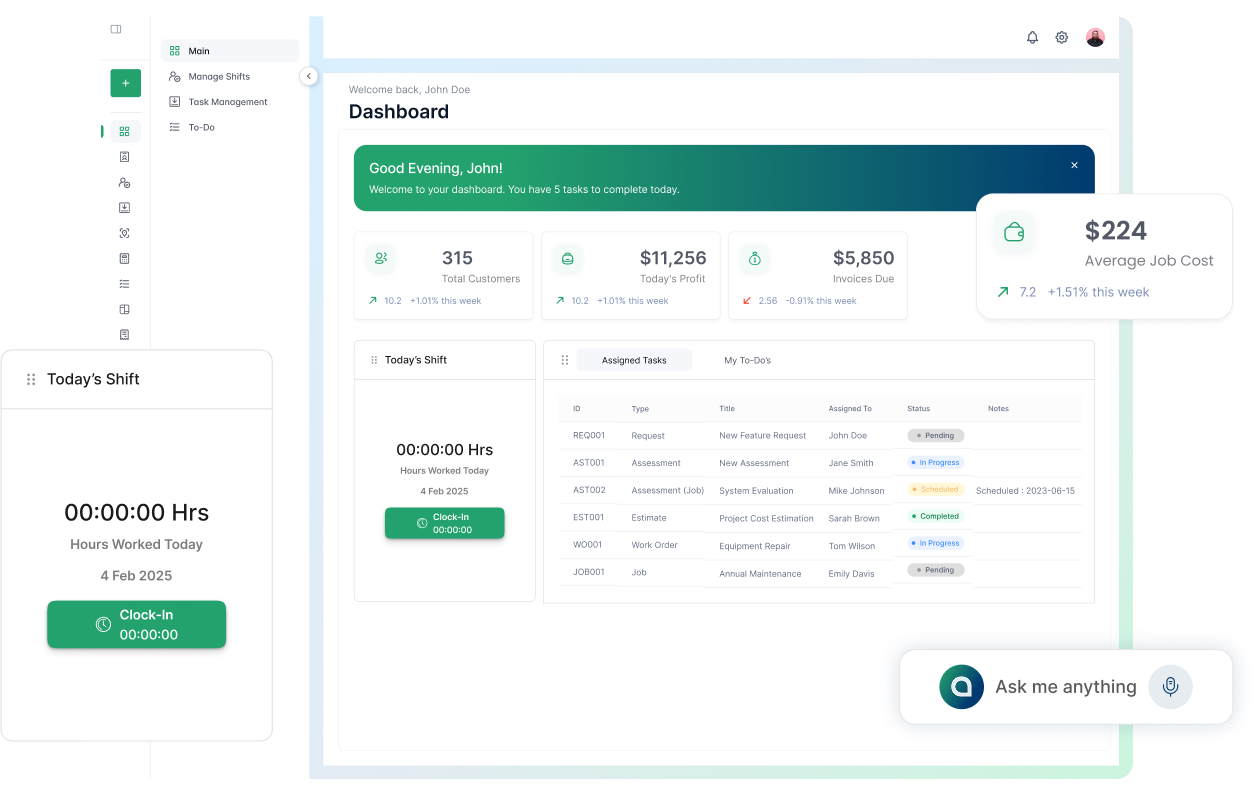
Once a quote is approved, the operational side begins: crew scheduling, material tracking per job, R-value and square footage logs, jobsite documentation, and invoicing. If those steps live in spreadsheets or disconnected apps, the accuracy won at estimate time drifts away job by job.
The teams that hold margin run a connected flow:
| Layer | Purpose |
|---|---|
| Visual estimating tool | Pre-job measurement and forecasting |
| Field workflow platform | Scheduling, material logs, documentation |
| Billing | Invoice and payment from the completed job |
That is where a platform like Cleri fits: not as a 3D modeling tool (measurement specialists do that better), but as everything after the measurement. Estimates built from square footage, R-value, and material type convert to scheduled jobs without re-entry, foam and sealant usage logs per job keep future estimates honest, invoices generate on completion, and Cleo, the voice assistant, lets crews log materials and send the invoice while still on-site. The full toolkit is on our insulation business software page.
Common mistakes with visual estimating tools
Digital modeling helps, but misuse creates new problems:
- Ignoring waste factor adjustments per substrate and season
- Using default depth settings on every job
- Never comparing projected vs actual material usage
- Letting pricing templates go stale
- Treating estimating as a standalone system, disconnected from jobs and billing
Most estimating errors do not come from the software. They come from skipped adjustments and disconnected workflows. A monthly review of projected vs actual per job is the single habit that keeps estimates realistic over time.
Benefits and limits at a glance
| Area | What visual estimating improves | What it does not handle |
|---|---|---|
| Measurement | Accurate square footage | Real-time usage tracking |
| Forecasting | Board feet projection | Labor monitoring |
| Proposals | Professional presentation | Crew scheduling |
| Speed | Faster quote turnaround | Invoice automation |
Estimating improves the front end of a project. Execution tools protect what the estimate promised. Both matter; they solve different problems.
FAQs
Q 1. What is 3D spray foam estimating?
Digital modeling that calculates square footage, depth, and board feet before installation begins, replacing manual measurement math.
Q 2. Does it guarantee profit?
No. It improves pricing accuracy; profit still depends on labor control and material tracking during the job.
Q 3. Can visual estimating tools track foam usage live?
No. They project. Live tracking of what crews actually spray requires field workflow software.
Q 4. Is 3D estimating worth it for commercial projects?
Yes, complex layouts and large jobs are where measurement precision pays back fastest.
Q 5. Should estimating connect to scheduling and billing?
Yes. Approved estimates that flow into jobs and invoices without re-entry are where the admin savings live. Our comparison of spray foam estimating software covers which platforms handle that flow.
Choosing tools that fit real workdays
If your estimates are built on-site and jobs move fast, visual tools tighten your numbers. But measurement accuracy only survives if scheduling, material tracking, and invoicing stay connected to it from quote to payment.
See what the connected half of the workflow looks like.
No credit card. Run one real job through it, estimate to invoice, and compare projected vs actual by Friday.
Reviewed by Brandon Parham, industry expert. Last updated August 2026.
Related Articles

Plumbing Job Management Software: What It Actually Runs
The call that breaks your day is never the...
5 Jobber Alternatives for Small Trade Crews (2026)
Jobber is good software, and plenty of crews...
5 Housecall Pro Alternatives for Trade Businesses (2026)
Most owners I talk to don't leave Housecall Pro...
12 Window Cleaning Software Mistakes to Avoid
Common mistakes businesses make when choosing...
Window Cleaning Management Software & CRM: A Complete Guide
How Window Cleaning Software Saves Time and...
HVAC CRM Software: Why Contractors Outgrow Generic CRMs
Most HVAC companies start with whatever CRM was...
.webp)
SaaS vs On-Premise for Window Cleaning Businesses
SaaS vs. On-Premise: What's Better for Window...

Vibe Coded Field Service Software: Risks to Check First
Something new is happening in the field service...

How to choose the right software for your window cleaning company
Still using paper schedules, texting your crew...
.webp)
Best Spray Foam Estimating Software Compared (2026)
Quoting spray foam jobs has changed. Customers...

Why Lawn Care CRM Software Matters in 2026
Lawn care CRM software: Why 91% of growing teams...

What Is Window Cleaning Business Software & Who Needs It?
Picture the real morning rush.
It’s 5:30 a.m. You...
.png "Frame 1984078137 (1)")
Try Cleri’s 14-day free trial and
see for yourself
No credit card. No setup calls. Just your real jobs, your real crew, and a
smoother, more predictable week.
